All work

Personal project · Designing with AI

Work in progress

Kain & Train: A macro tracker for the food people actually eat

Restructuring a tedious logging task so it fits how Filipino and Asian home cooks actually eat. “Kain” is Tagalog for “eat.”

Role
Product designer and primary user
Built with
Claude, as AI collaborator
Timeline
One working session, Oct. 20, 2026; in daily use since
Platform
Claude Project (coach) and a web dashboard for phone and desktop
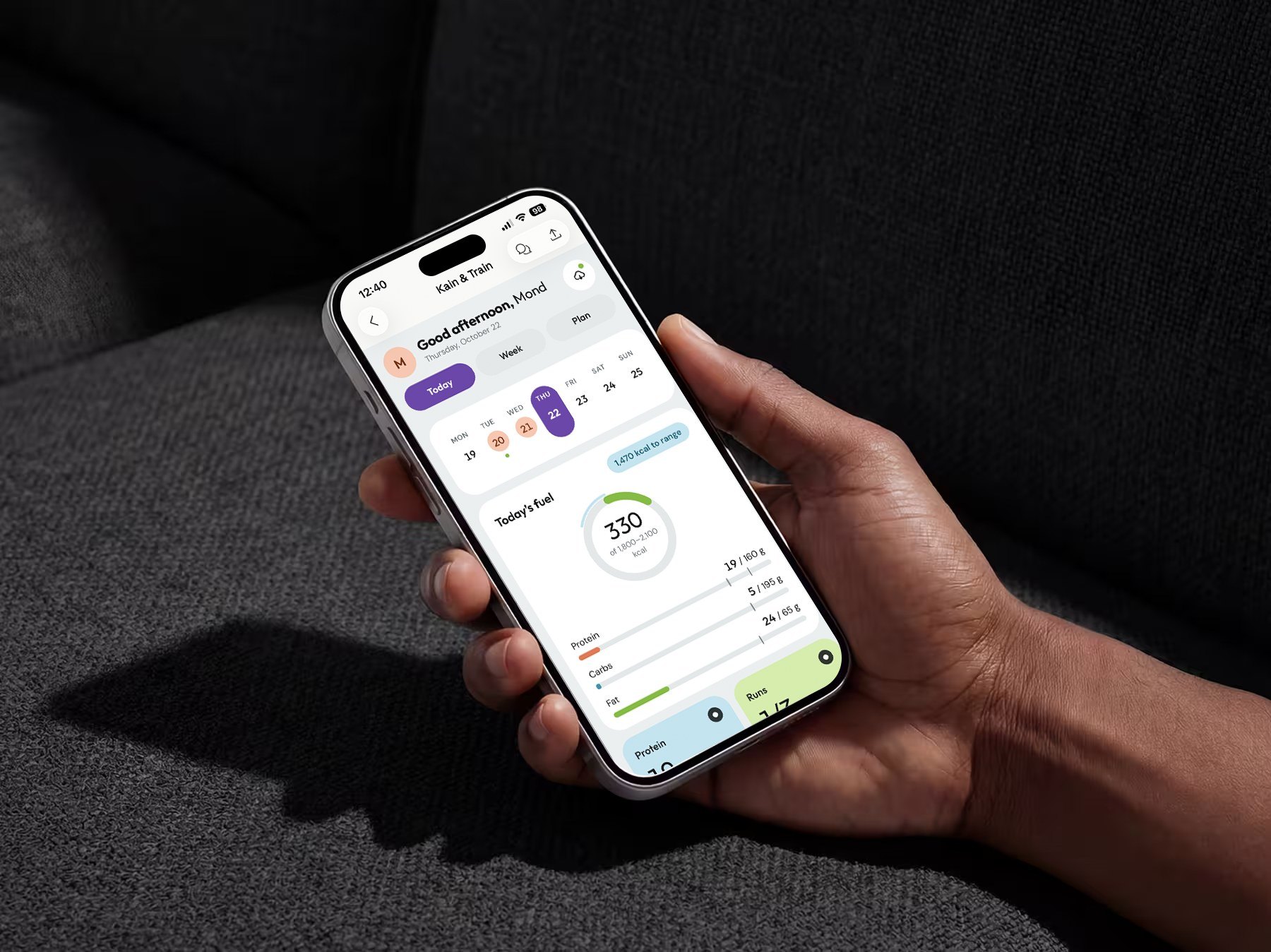
Kain & Train on an iPhone held in one hand: the purple Today tab, a week strip, and a calorie ring at 330 of 1,800 to 2,100 kcal with protein, carb and fat bars.

The short version

Problem

I quit Lose It and MyFitnessPal for the same reason: they made me break home-cooked Filipino dishes like adobo and sinigang into ingredients. Entries felt wrong, results never showed, and logging stopped.

What I did

Designed a two-layer system with Claude: a coach that holds my targets and runs a weekly check-in, and a dashboard I can log from in seconds. It logs dishes, plans around rice, and uses the weekly weight trend as its accuracy check.

Result

Live and in daily use since Oct. 20, 2026. Results come after four weeks of use, so every number has a baseline.

  • —Days logged per weekWIPAfter 4 weeks of tracking
  • —Protein target hit rateWIPAfter 4 weeks of tracking
  • —Weekly trend against target paceWIPAfter 4 weeks of tracking

01 · Context

Logging breaks first for food the apps don’t model well.

Nutrition tracking only works if people keep logging. My meals are mostly Filipino, Filipino-American and Asian home cooking: carb-heavy, built around white rice, and cooked as whole dishes three to four times a week.

The stakes were personal but concrete: a weight-loss goal with a deadline, a two-hour training window before work (4:30 to 6:30 am, “dad hours”), and a hard requirement to get there without injury.

“Being happy and confident when I look at myself in the mirror.”The goal, in my own words
How much do user-submitted entries disagree on the same dish?
Dish, 1 servingLowest entryHighest entry
Chicken adobo319 kcal684 kcal
Sinigang180 kcal330 kcal
Tapsilog364 kcal670 kcal
Pancit150 kcal330 kcal
Lumpia55 kcal133 kcal

02 · The problem, reframed

I don’t cook ingredients. I cook dishes.

The apps didn’t fail because I lacked discipline. They asked for a unit of input, ingredients, that doesn’t match how I cook or eat, then asked me to trust numbers that felt wrong.

“Logging my food became tedious, especially when I was eating Filipino or Asian food. I’d have to break down each dish to the ingredient to log it and portion it out from there.”
Failure modeWhat happenedDesign implication
Ingredient-level loggingEvery home-cooked dish had to be broken down and portioned by handLog the dish, never the ingredients
Low trust in accuracyEntries felt wrong, so the totals felt meaninglessMove accuracy from the user to the system
No feedback loopNo visible results, so no reason to keep loggingMake progress visible daily and weekly
Rice treated as the enemyApp defaults push you to cut the staple of every mealPlan around rice instead of banning it

Source: my own experience with two apps, surfaced through a seven-question intake before any design work. n = 1. Time on each app before quitting: [TBD: weeks].

03 · My role

Designer, decision-maker and user. Claude was my collaborator.

Claude helped with research questions, domain logic, prompt writing and the front-end build. Every recommendation passed through me.

I owned

  • The brief and requirements: personal macros, food and recipe suggestions, workout splits built on equipment I own
  • The root-cause insight: ingredient-level logging is why I quit
  • The mid-project constraint, and the decision to redesign around it
  • Visual direction: the fitness-app reference, pill-shaped CTAs, ube purple as the brand accent
  • Accepting or rejecting every recommendation, including the slower pace

Claude produced, I directed and approved

  • The seven-question discovery intake
  • Nutrition and training logic: targets, splits, progression
  • The Project instructions, the coach’s behavioral spec, including the rule to ask at most one question, only when it moves the total by ~150 kcal
  • The dashboard front end, including the AI estimate call and the confirm-before-adding step, which I adopted as a rule
  • Three visual iterations, from my direction
  • The two-layer system: a coach that holds the plan, and a dashboard for fast daily logging
  • Treating rice as something to plan around, not cut. I adopted it as a core principle: rice is a dial, not a ban

04 · Constraints and success criteria

Keep logging past the point where the other apps failed.

Constraints

  • Time: training fits a 4:30 to 6:30 am window, at least three days a week. The dashboard has to work before dawn, on a phone, without opening a chat.
  • Equipment: adjustable dumbbells, a flat/incline bench, one 25 lb kettlebell, resistance bands. Nothing else.
  • Body: a desk job, a running restart from zero, and a body that needs a gradual ramp.
  • Food: real meals only. Adobo with rice, fried chicken with rice, eggs with rice, a Greek yogurt bowl, fast-food tacos, fruit.
  • Dependencies: AI estimates and cloud sync might not always be available, so core logging can’t depend on either.

Success criteria

CriterionTargetDefined
Primary: logging adherence7 days per week, for longer than past apps lastedAt intake
Protein target140 g minimum on [TBD: X of 7] daysAdded at the mid-project redesign
Weekly trend1 to 1.5 lb per weekAdded during goal pushback (Decision 3)
GuardrailZero training stoppages from pain; daily intake above ~1,700 kcalNo current injuries

The primary criterion came straight from the intake. Criteria added later are marked as added.

05 · Key decisions

Trading precision for a habit I can keep.

  1. 1

    Log the dish, and let the weekly trend check accuracy

    WIP · being tested

    Options

    • A better ingredient database
    • Barcode and recipe import
    • Dish-level estimates with a trend-based correction (chosen)

    Why this one

    Ingredient breakdown was why I quit, so a better ingredient database would fix the wrong problem. I log in plain language (“adobo, 1 cup rice”) or with a photo. The system matches saved meals first, then estimates, rounds to the nearest 10 kcal and 5 g, states its assumption in one line, and asks at most one question, only if the answer moves the total by more than ~150 kcal.

    What I gave up

    Precision on any single entry. If the 7-day average weight stalls, the target adjusts; I never have to log more precisely. Accuracy becomes the system’s job, not mine. I’ll confirm the correction holds once there are several weeks of data.
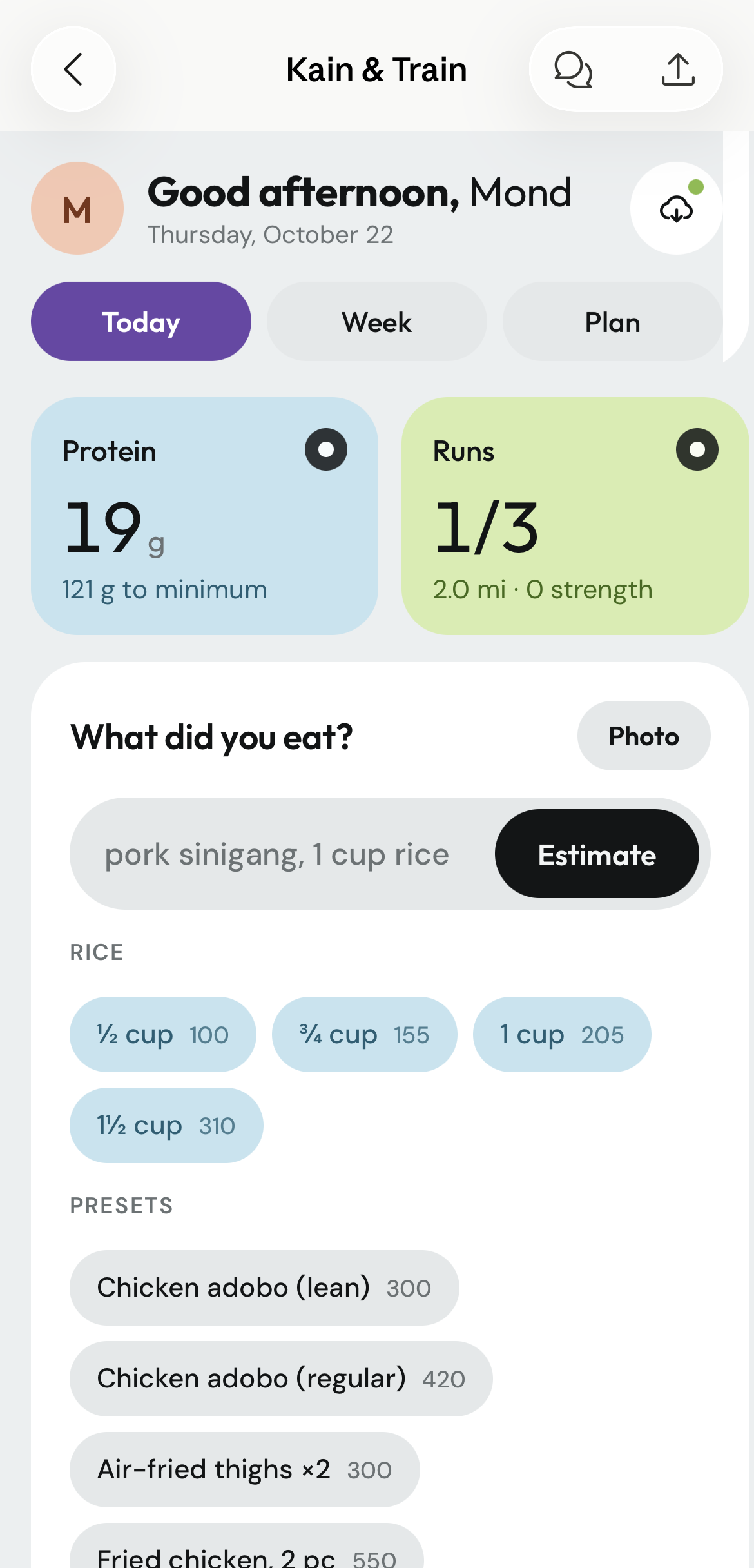
    Today tab: protein 19 g with 121 g to the minimum, runs 1 of 3, a What did you eat? field reading pork sinigang, 1 cup rice, with Estimate, rice chips for ½, ¾, 1 and 1½ cups, and saved-meal presets such as Chicken adobo (lean), 300.
  2. 2

    AI suggests, I confirm

    Options

    • Auto-log the AI estimate
    • Manual entry only
    • AI estimate in a review card I approve (chosen)

    Why this one

    Claude proposed the confirm step, and I adopted it: an estimate logged without review repeats the old trust problem. The review card shows the model’s assumption, I can remove items one at a time, and the estimate prompt includes my saved meals so numbers stay consistent. Every log and delete offers Undo.

    What I gave up

    One extra tap per AI-estimated log, in exchange for trust in the total.
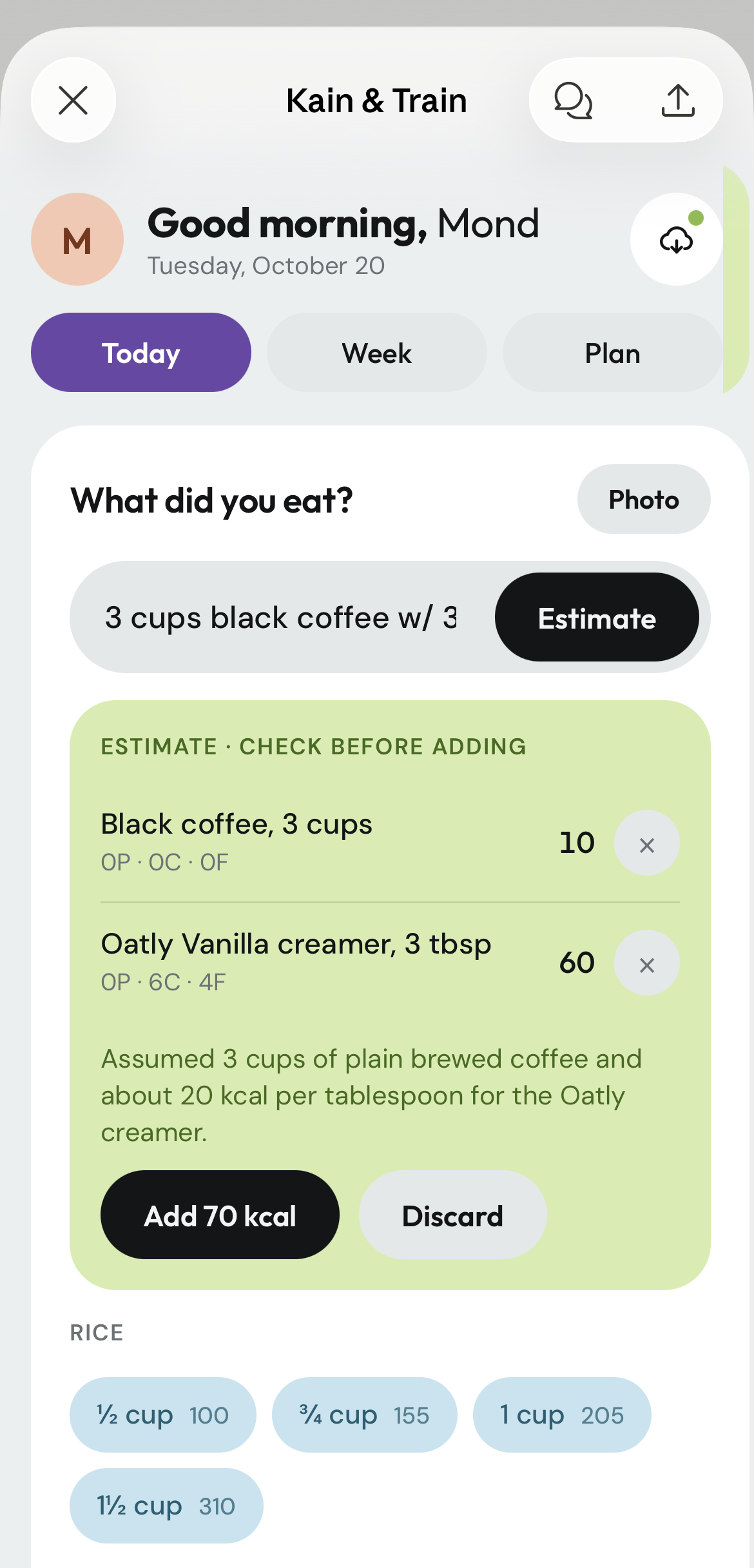
    Estimate card, Check before adding: black coffee, 3 cups, 10 kcal, and Oatly vanilla creamer, 3 tbsp, 60 kcal, each removable, the stated assumption, and Add 70 kcal or Discard.
  3. 3

    Slow the goal down to protect it

    The tension

    My brief asked for about 2 lb a week, without injury. That pace conflicts with “without injury,” and the running plan went from 0 to 6 miles a week: aggressive for a restart from zero.

    What I chose

    A pace of 1 to 1.5 lb a week, which still lands before my deadline. The running plan stays, with walk breaks, an easy pace, a defined stop signal for pain, and mileage growth capped at ~10% a week after the ramp.

    Why this one

    A good system respects the user’s goal while protecting them from the version of it that fails. I designed it to push back on its own user.

    What I gave up

    The faster timeline I asked for.

When the constraint changed mid-design

Partway through, a change in my health context made under-eating, not over-eating, the main risk. The core logic had to invert.

BeforeAfterWhy
One fixed target, 2,000 kcalA range of 1,800 to 2,100, with a floor near 1,700Under-eating costs muscle
Protein as one macro of threeProtein first: 140 g minimum, 160 g goalProtecting muscle serves the actual goal
Warn when overNudge in the evening when protein or calories are too lowThe risk flipped direction
Generic morningA morning routine designed around a 30-minute waitTurned dead time into mobility work
Check-in adds calories if loss is too fastCheck protein and strength first, then suggest discussing the pace with a clinicianKeeps the system inside a safe scope

06 · The solution

Two layers, one system.

The dashboard is fast enough to use at 4:30 am. The Claude Project holds the plan and does the thinking once a week. A copyable summary bridges them, so nothing is retyped.

Dashboard · daily, in seconds

  1. 1 · Type or snap what I ate
  2. 2 · Saved meal match, else AI estimate
  3. 3 · I confirm before anything is addedClaude’s suggestion, made a rule
  4. 4 · Logged, with Undo
Copy summary
weekly totals, pasted into the coach
Adjusted targets
back to the dashboard

Claude Project · the coach, weekly

  1. Holds targets, splits and saved meals
  2. Reads the weekly summary and 7-day weight average
  3. Adjusts the target if the trend stalls
  4. Replies to every log with the same four-line status
The system. The highlighted step was Claude’s suggestion, and I made it a rule: no AI estimate reaches the log without my confirmation.

The dashboard: Today, Week, Plan

Tabs are ordered by how often I use them. The Today tab reads top to bottom, summary before detail.
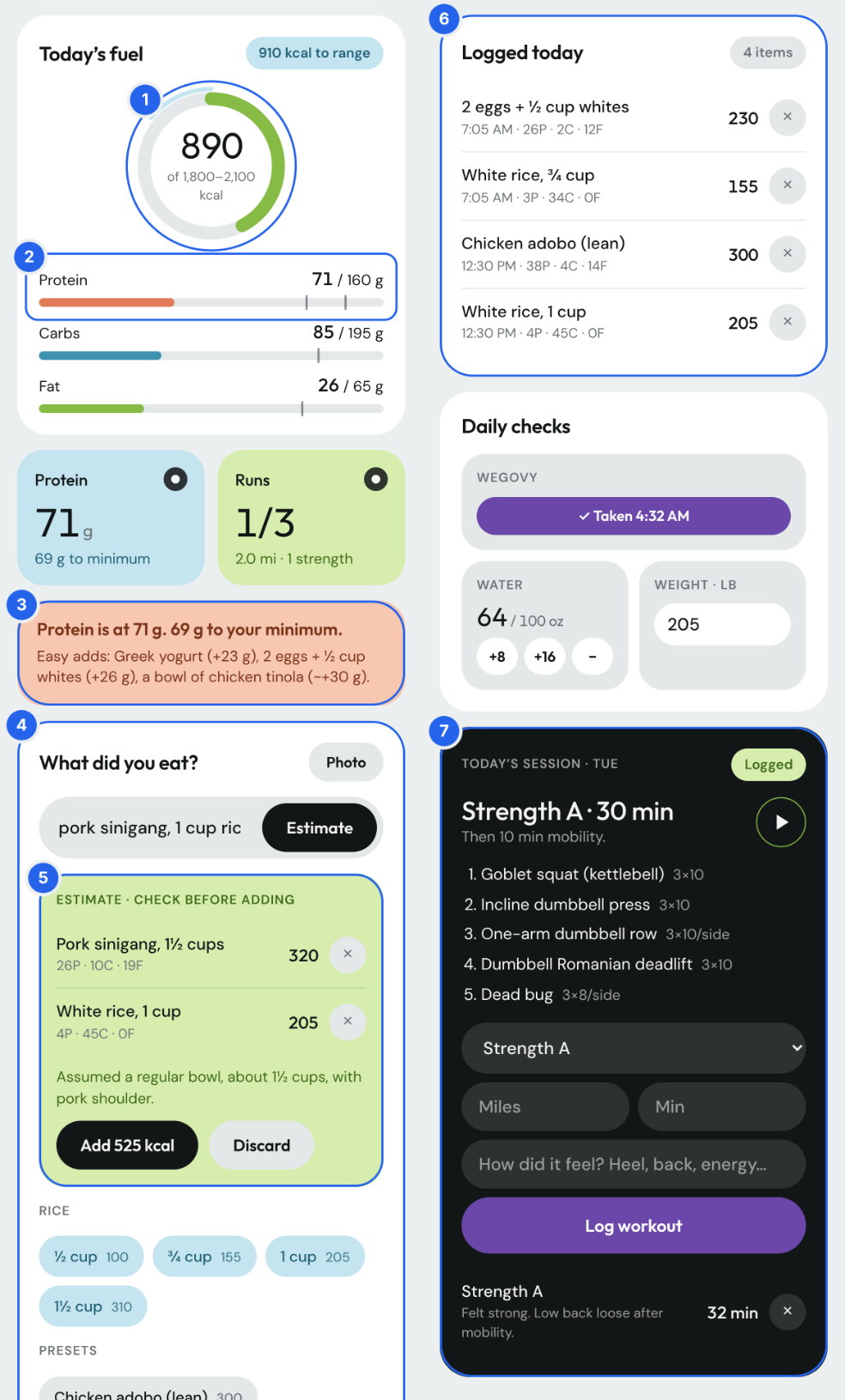
Annotated Today tab with seven numbered callouts: 1, the calorie ring at 890 of 1,800 to 2,100 kcal; 2, the protein bar at 71 of 160 g with minimum and goal ticks; 3, a low-protein nudge with easy adds; 4, the What did you eat? input; 5, the estimate review card; 6, Logged today with four removable items; 7, today’s Strength A session and workout log.
Today tab
  1. 1Calorie ring with the target range drawn as an outer arc, not a single numberWhen the constraint changed
  2. 2Protein bar marked at both the minimum and the goalWhen the constraint changed
  3. 3A nudge that appears only when protein or calories run low late in the dayWhen the constraint changed
  4. 4“What did you eat?” input: free text or photo, one-tap rice chips (½, ¾, 1, 1½ cups) and saved-meal chipsDecision 1
  5. 5Review card showing the AI’s assumption before anything is addedDecision 2
  6. 6Logged today, with delete and Undo on every itemDecision 2
  7. 7Training card with today’s session and a one-line workout log
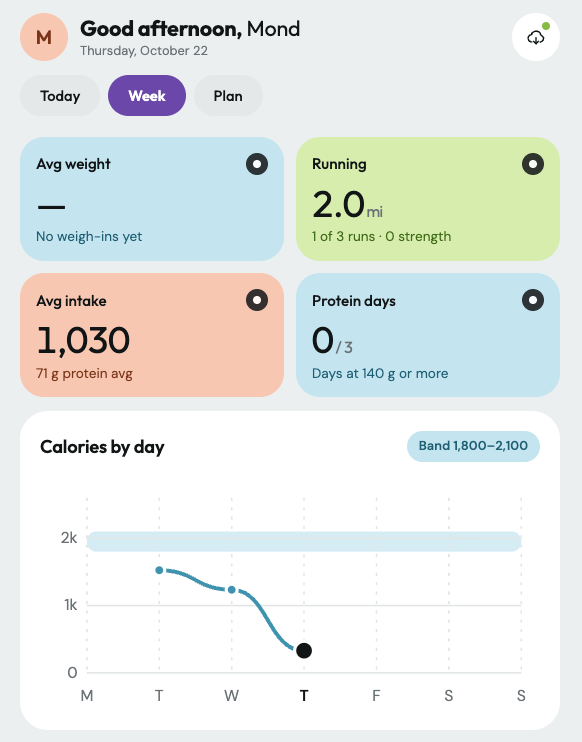
Week tab: average intake 1,030 kcal with 71 g protein, 2.0 miles run, 0 of 3 protein days, and a Calories by day line chart below the 1,800 to 2,100 kcal band.
Week tab

Designed for absence

If AI estimates are unavailable, saved meals still work. If cloud sync is unavailable, entries save on the device, and the header says which mode is active.

A predictable coach

After every log in the Project, the coach replies with the same four-line status: calories against target, the three macros, what’s left, and one optional tip. Same shape every time, so it scans at a glance.

Visual iterations

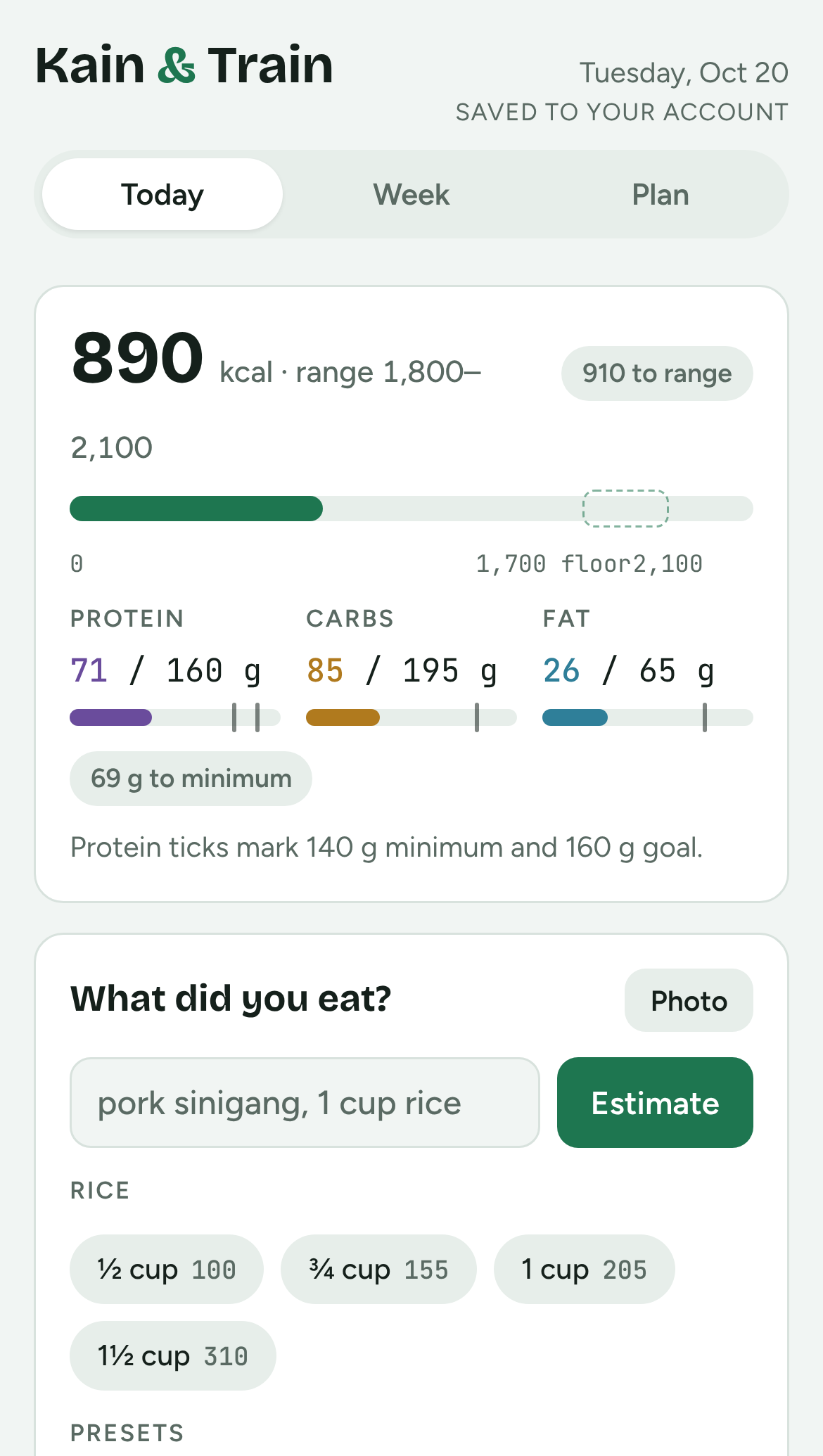
  1. Version 1: green accent, compact cards and linear progress bars, with 890 kcal against a 1,700 kcal floor.
    v1 · UtilitarianGreen accent, compact cards, linear bars. It worked, but felt like a spreadsheet.
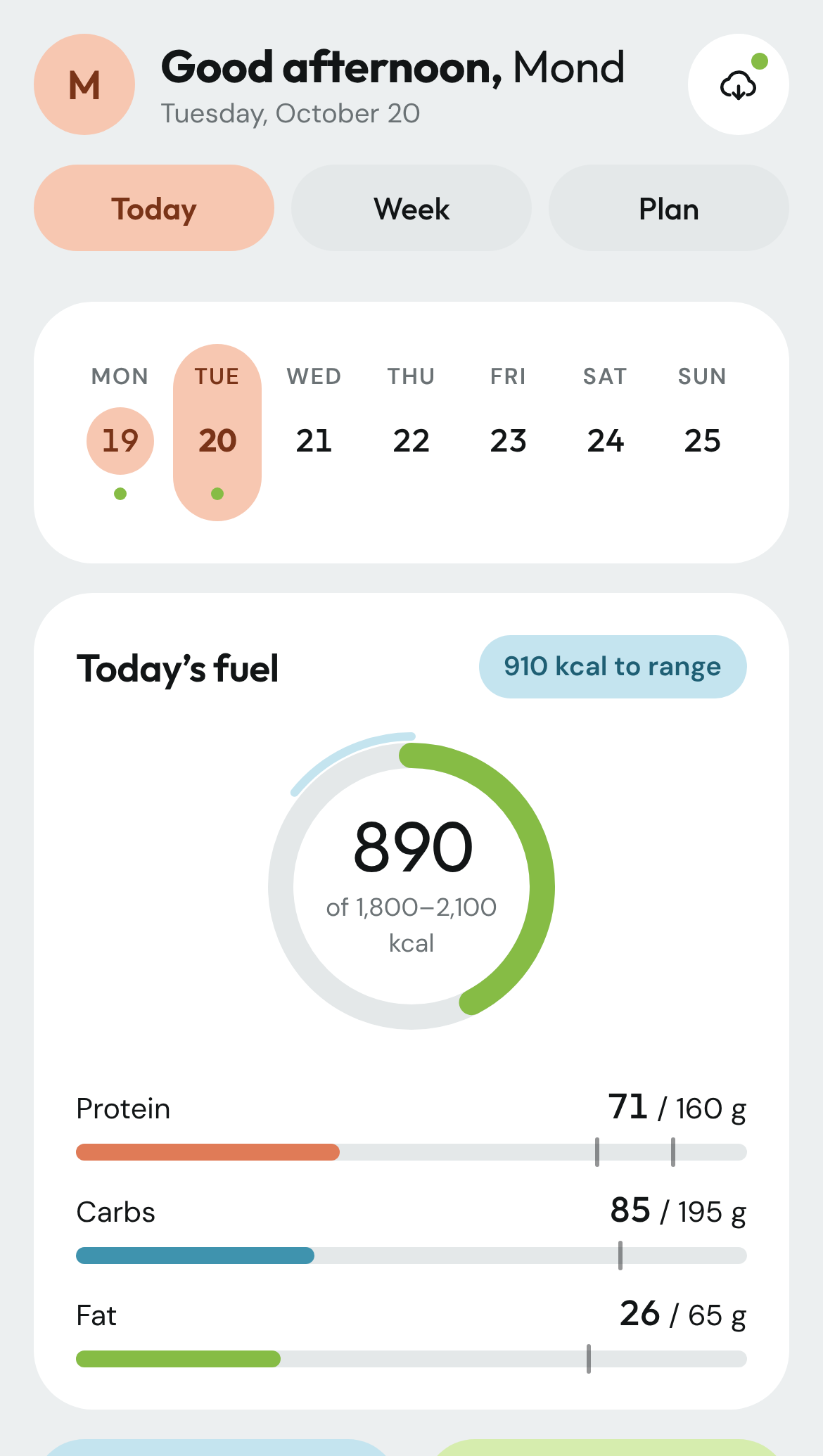
  2. Version 2: peach active states, rounded cards, pill tabs, a week strip and a calorie ring.
    v2 · Restyled from a referenceA fitness-app reference for its rounded CTAs: large rounded cards, pill buttons and chips, pastel stat tiles, a calorie ring, a dark training card.
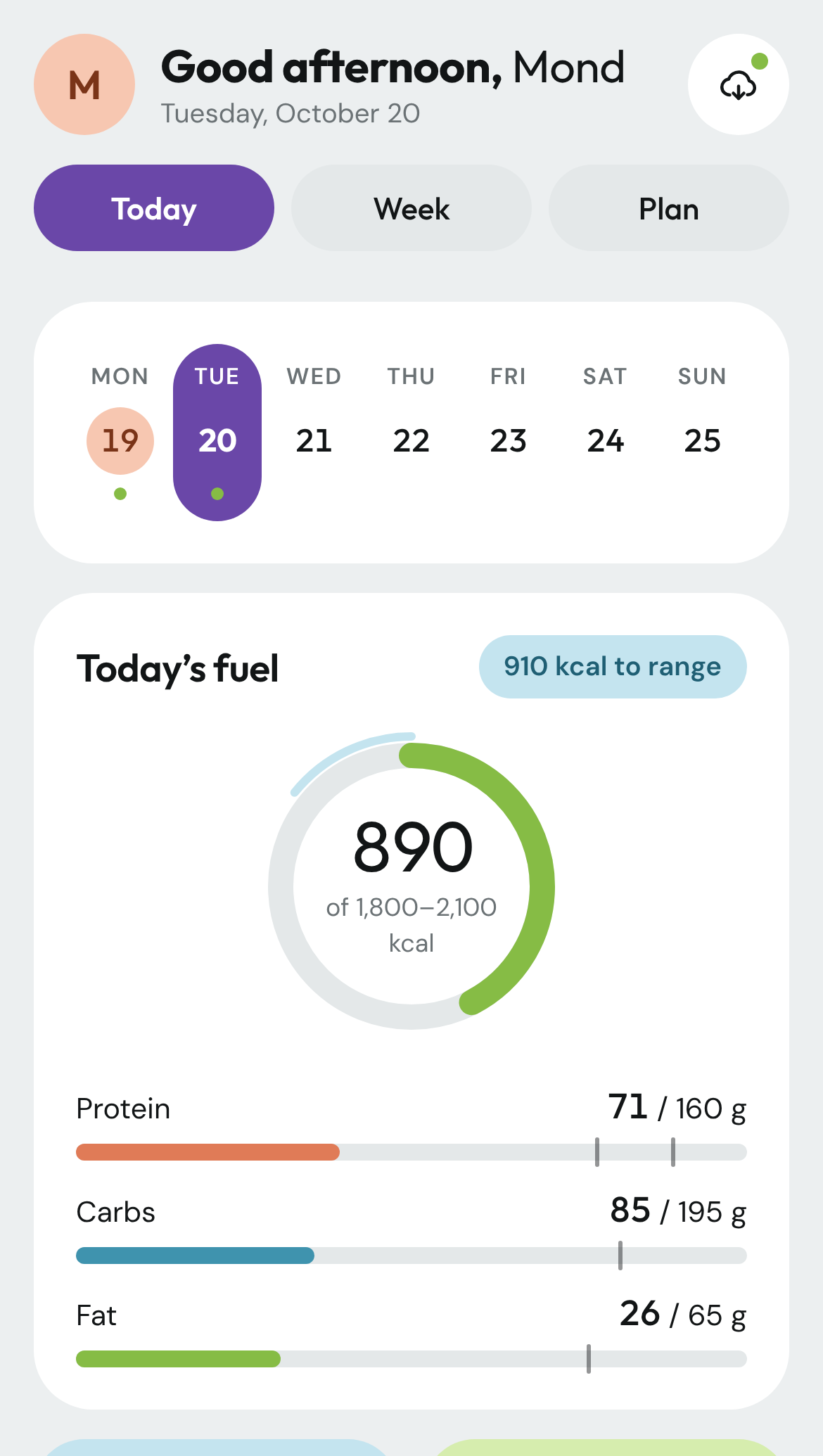
  3. Version 3: the same layout with ube purple on the active tab and the selected day.
    v3 · A brand momentUbe purple on every active and selected state: tabs, buttons, toggles, today’s marker, focus outlines. Dark mode uses a lighter lavender to stay readable.

07 · Validation

Pressure-tested in daily use.

I’m testing Kain & Train as its designer and its daily user. It’s a deliberate stretch project: a way to grow my practice of designing with Claude, from a plain-language brief to a live, restyled product.

  • What pressure-testing looks like

    • Daily use since Oct. 20, 2026. Every log, check-in and training session tests whether the friction is really gone.
    • A friction log. Anything slow, wrong or skipped goes on the backlog and drives the next iteration.
    • Real context changes. A change in my health context forced the logic inversion in section 05. The system adapted to a real constraint, not a hypothetical one.
  • What I’m learning about designing with Claude

    • Where it speeds the work up: discovery questions, domain logic, front-end builds, and visual iteration in minutes instead of days.
    • Where my judgment stays in the loop: what the product should refuse to do, choosing between its recommendations, and a human confirmation step on every AI estimate.
    • A system prompt is a behavioral spec, and it needs debugging when the coach drifts. [TBD: one instruction you rewrote, and what changed.]

08 · Outcomes

WIP · 4-week tracking

Too early for results. Here’s what I’m measuring.

The system went live Oct. 20, 2026. Results land after at least four weeks, so every number has a baseline, a window and a source.

MetricResultBaselineWindowSource
Logging adherence, days per weekWIP[TBD: weeks before quitting past apps]First 4 weeksDashboard log
Protein target hit rate, days at 140 g+WIPNone (new target)First 4 weeksWeek tab summary
Weekly average weight trendWIPTarget: 1 to 1.5 lb per weekFirst 4 weeksMorning weigh-ins, 7-day average
Training adherence, sessions per weekWIPPlan: 3 runs + 2 strengthFirst 4 weeksWorkout log
Guardrail: injury or pain stoppagesWIPZeroFirst 4 weeksWorkout log
Logging friction (qualitative)WIPPast apps: tedious enough to quitFirst 4 weeksFriction log

How to read these numbers

They come from one user, me. They show the system holds up in real daily use, not that it works for everyone. The project’s purpose is learning to design with Claude.

WIP“A reflection after four weeks of use, from me or a test participant.”

09 · Reflection

What I’d do differently, so far.

I designed for one user: me.

I’d bring in other Filipino and Asian home cooks before the first build, not after. My presets reflect my meals and the estimate prompt is tuned to them, so I don’t yet know how well “log the dish” works for someone else’s adobo.

Principles I’m carrying forward

  • Precision was the wrong goal.

    The apps I quit optimized for accurate entries and lost me as a user. Moving accuracy to the weekly trend is my bet on logging I can keep doing, and it’s still being tested.

  • Prompt instructions are a product spec.

    The coach’s tone, output format, escalation rules and scope limits are design decisions, written in words instead of screens.

  • The AI suggests; the person decides.

    Every estimate passes through a confirm step. Trust came from showing the assumption, not hiding it.

  • Context changes the logic, not just the screens.

    When the main risk flipped from over-eating to under-eating, every warning, target and check-in rule had to flip with it.

Next

Add saved meals from the dashboard, surface recipes based on remaining macros, and move to the next training block. A standalone app is possible later, and out of scope for now.

Have a problem like this? I’m open to senior product design roles. Reach out by email or LinkedIn.
Email me
Next case study Vehicle Preview Enhancements Restructuring how CarMax dealers move through vehicle photos, so inspecting damage stops interrupting the evaluation.
All work

Personal project · Designing with AI

Work in progress

Kain & Train: A macro tracker for the food people actually eat

Restructuring a tedious logging task so it fits how Filipino and Asian home cooks actually eat. “Kain” is Tagalog for “eat.”

Role
Product designer and primary user
Built with
Claude, as AI collaborator
Timeline
One working session, Oct. 20, 2026; in daily use since
Platform
Claude Project and a web dashboard
Kain & Train on an iPhone held in one hand: the purple Today tab, a week strip, and a calorie ring at 330 of 1,800 to 2,100 kcal with protein, carb and fat bars.

The short version

Problem

I quit Lose It and MyFitnessPal for the same reason: they made me break home-cooked Filipino dishes like adobo and sinigang into ingredients. Entries felt wrong, results never showed, and logging stopped.

What I did

Designed a two-layer system with Claude: a coach that holds my targets and runs a weekly check-in, and a dashboard I can log from in seconds. It logs dishes, plans around rice, and uses the weekly weight trend as its accuracy check.

Result

Live and in daily use since Oct. 20, 2026. Results come after four weeks of use, so every number has a baseline.

  • Days logged per weekWIP
  • Protein target hit rateWIP
  • Weekly trend vs. target paceWIP

WIP: these fill in after four weeks of tracking.

01 · Context

Logging breaks first for food the apps don’t model well.

Nutrition tracking only works if people keep logging. My meals are mostly Filipino, Filipino-American and Asian home cooking: carb-heavy, built around white rice, and cooked as whole dishes three to four times a week.

The stakes: a weight-loss goal with a deadline, a two-hour training window before work (4:30 to 6:30 am, “dad hours”), and a hard requirement to get there without injury.

“Being happy and confident when I look at myself in the mirror.”The goal, in my own words
How much do user-submitted entries disagree on the same dish?
DishLowHigh
Chicken adobo319 kcal684 kcal
Sinigang180 kcal330 kcal
Tapsilog364 kcal670 kcal
Pancit150 kcal330 kcal
Lumpia55 kcal133 kcal

02 · The problem, reframed

I don’t cook ingredients. I cook dishes.

The apps didn’t fail because I lacked discipline. They asked for a unit of input, ingredients, that doesn’t match how I cook or eat, then asked me to trust numbers that felt wrong.

“Logging my food became tedious, especially when I was eating Filipino or Asian food. I’d have to break down each dish to the ingredient to log it and portion it out from there.”
  • Ingredient-level loggingEvery home-cooked dish had to be broken down and portioned by hand.→ Log the dish, never the ingredients
  • Low trust in accuracyEntries felt wrong, so the totals felt meaningless.→ Move accuracy from the user to the system
  • No feedback loopNo visible results, so no reason to keep logging.→ Make progress visible daily and weekly
  • Rice treated as the enemyApp defaults push you to cut the staple of every meal.→ Plan around rice instead of banning it

Source: my own experience with two apps, surfaced through a seven-question intake before any design work. n = 1. Time on each app before quitting: [TBD: weeks].

03 · My role

Designer, decision-maker and user. Claude was my collaborator.

I owned

  • The brief and requirements: personal macros, food and recipe suggestions, workout splits built on equipment I own
  • The root-cause insight: ingredient-level logging is why I quit
  • The mid-project constraint, and the decision to redesign around it
  • Visual direction: the fitness-app reference, pill-shaped CTAs, ube purple as the brand accent
  • Accepting or rejecting every recommendation, including the slower pace

Claude produced, I directed and approved

  • The seven-question discovery intake
  • Nutrition and training logic: targets, splits, progression
  • The coach’s behavioral spec, including asking at most one question, only when it moves the total by ~150 kcal
  • The dashboard front end, including the AI estimate call and the confirm-before-adding step, which I adopted as a rule
  • Three visual iterations, from my direction
  • The two-layer system: coach plus fast daily dashboard
  • Rice as something to plan around, not cut. I adopted it as a principle: rice is a dial, not a ban

04 · Constraints and success criteria

Keep logging past the point where the other apps failed.

Constraints

  • Time: training fits 4:30 to 6:30 am, at least three days a week. The dashboard has to work before dawn, on a phone, without opening a chat.
  • Equipment: adjustable dumbbells, a flat/incline bench, one 25 lb kettlebell, resistance bands.
  • Body: a desk job, a running restart from zero, and a need for a gradual ramp.
  • Food: real meals only. Adobo with rice, fried chicken with rice, eggs with rice, a Greek yogurt bowl, fast-food tacos, fruit.
  • Dependencies: core logging can’t depend on AI estimates or cloud sync.

Success criteria

  • Primary: logging adherence7 days per week, for longer than past apps lastedDefined at intake
  • Protein target140 g minimum on [TBD: X of 7] daysAdded at the mid-project redesign
  • Weekly trend1 to 1.5 lb per weekAdded during goal pushback (Decision 3)
  • GuardrailZero training stoppages from pain; daily intake above ~1,700 kcalNo current injuries

05 · Key decisions

Trading precision for a habit I can keep.

  1. 1

    Log the dish, and let the weekly trend check accuracy

    WIP · being tested

    Options

    • A better ingredient database
    • Barcode and recipe import
    • Dish-level estimates with a trend-based correction (chosen)

    Why this one

    Ingredient breakdown was why I quit, so a better ingredient database would fix the wrong problem. I log in plain language (“adobo, 1 cup rice”) or with a photo. Saved meals match first, then the system estimates, rounds to 10 kcal and 5 g, states its assumption, and asks at most one question, only if it moves the total by more than ~150 kcal.

    What I gave up

    Precision on any single entry. If the 7-day average weight stalls, the target adjusts. Accuracy becomes the system’s job, not mine. I’ll confirm it holds once there are several weeks of data.

  2. 2

    AI suggests, I confirm

    Options

    • Auto-log the AI estimate
    • Manual entry only
    • AI estimate in a review card I approve (chosen)

    Why this one

    Claude proposed the confirm step, and I adopted it: an estimate logged without review repeats the old trust problem. The card shows the model’s assumption, I can remove items one at a time, and saved meals keep estimates consistent. Every log and delete offers Undo.

    What I gave up

    One extra tap per AI-estimated log, in exchange for trust in the total.

  3. 3

    Slow the goal down to protect it

    The tension

    My brief asked for about 2 lb a week, without injury. That pace conflicts with “without injury,” and the running plan went from 0 to 6 miles a week.

    What I chose

    1 to 1.5 lb a week, still before my deadline. Running stays, with walk breaks, an easy pace, a stop signal for pain, and mileage growth capped at ~10% a week after the ramp.

    What I gave up

    The faster timeline I asked for. A good system respects the goal while protecting the user from the version of it that fails.

When the constraint changed mid-design

A change in my health context made under-eating, not over-eating, the main risk. The core logic had to invert.

  • One fixed target, 2,000 kcalA range of 1,800 to 2,100, with a floor near 1,700Under-eating costs muscle
  • Protein as one macro of threeProtein first: 140 g minimum, 160 g goalProtecting muscle serves the actual goal
  • Warn when overNudge in the evening when protein or calories are too lowThe risk flipped direction
  • Generic morningA morning routine designed around a 30-minute waitTurned dead time into mobility work
  • Check-in adds calories if loss is too fastCheck protein and strength first, then suggest discussing the pace with a clinicianKeeps the system inside a safe scope

06 · The solution

Two layers, one system.

The dashboard is fast enough to use at 4:30 am. The Claude Project holds the plan and does the thinking once a week. A copyable summary bridges them, so nothing is retyped.

Dashboard · daily, in seconds

  1. 1 · Type or snap what I ate
  2. 2 · Saved meal match, else AI estimate
  3. 3 · I confirm before anything is addedClaude’s suggestion, made a rule
  4. 4 · Logged, with Undo
Copy summary down, adjusted targets back up

Claude Project · the coach, weekly

  1. Holds targets, splits and saved meals
  2. Reads the weekly summary and 7-day weight average
  3. Adjusts the target if the trend stalls
  4. Replies to every log with the same four-line status
The highlighted step was Claude’s suggestion, and I made it a rule: no AI estimate reaches the log without my confirmation.

The dashboard: Today, Week, Plan

Tabs are ordered by how often I use them. The Today tab reads top to bottom, summary before detail.

Today tab
  1. 1Calorie ring with the target range as an outer arcWhen the constraint changed
  2. 2Protein bar marked at the minimum and the goalWhen the constraint changed
  3. 3A nudge only when protein or calories run low late in the dayWhen the constraint changed
  4. 4“What did you eat?” input, rice chips (½, ¾, 1, 1½ cups) and saved-meal chipsDecision 1
  5. 5Review card showing the AI’s assumptionDecision 2
  6. 6Logged today, with delete and Undo on every itemDecision 2
  7. 7Training card with today’s session and a one-line workout log
Week tab

Designed for absence

If AI estimates are unavailable, saved meals still work. If cloud sync is unavailable, entries save on the device, and the header says which mode is active.

A predictable coach

After every log, the coach replies with the same four-line status: calories against target, the three macros, what’s left, and one optional tip. It scans at a glance.

Visual iterations

  1. v1 · UtilitarianGreen accent, compact cards, linear bars. It worked, but felt like a spreadsheet.
  2. v2 · Restyled from a referenceRounded cards, pill buttons and chips, pastel stat tiles, a calorie ring, a dark training card.
  3. v3 · A brand momentUbe purple on every active and selected state. Dark mode uses a lighter lavender to stay readable.

07 · Validation

Pressure-tested in daily use.

I’m testing Kain & Train as its designer and its daily user: a deliberate stretch project to grow my practice of designing with Claude, from a plain-language brief to a live, restyled product.

What pressure-testing looks like

  • Daily use since Oct. 20, 2026. Every log, check-in and session tests whether the friction is gone.
  • A friction log. Anything slow, wrong or skipped drives the next iteration.
  • Real context changes. A change in my health context forced the logic inversion in section 05.

What I’m learning about designing with Claude

  • Where it speeds the work up: discovery, domain logic, front-end builds, visual iteration in minutes instead of days.
  • Where my judgment stays in the loop: what the product refuses to do, choosing between recommendations, and a confirm step on every AI estimate.
  • A system prompt is a behavioral spec, and it needs debugging when the coach drifts. [TBD: one instruction you rewrote, and what changed.]

08 · Outcomes

WIP · 4-week tracking

Too early for results. Here’s what I’m measuring.

Live since Oct. 20, 2026. Results land after at least four weeks, so every number has a baseline, a window and a source.

  • Logging adherence, days per weekWIPBaseline: [TBD: weeks before quitting past apps] · Dashboard log
  • Protein target hit rate, days at 140 g+WIPBaseline: none (new target) · Week tab summary
  • Weekly average weight trendWIPTarget: 1 to 1.5 lb per week · Morning weigh-ins, 7-day average
  • Training adherence, sessions per weekWIPPlan: 3 runs + 2 strength · Workout log
  • Guardrail: injury or pain stoppagesWIPTarget: zero · Workout log
  • Logging friction (qualitative)WIPPast apps: tedious enough to quit · Friction log

How to read these numbers

They come from one user, me. They show the system holds up in real daily use, not that it works for everyone.

WIP“A reflection after four weeks of use, from me or a test participant.”

09 · Reflection

What I’d do differently, so far.

I designed for one user: me.

I’d bring in other Filipino and Asian home cooks before the first build. My presets and estimate prompt are tuned to my meals, so I don’t yet know how “log the dish” works for someone else’s adobo.

Principles I’m carrying forward

Precision was the wrong goal.

The apps I quit optimized for accurate entries and lost me as a user. Moving accuracy to the weekly trend is my bet, and it’s still being tested.

Prompt instructions are a product spec.

Tone, output format, escalation rules and scope limits are design decisions, written in words instead of screens.

The AI suggests; the person decides.

Every estimate passes through a confirm step. Trust came from showing the assumption, not hiding it.

Context changes the logic, not just the screens.

When the risk flipped from over-eating to under-eating, every warning, target and check-in rule flipped with it.

Next

Add saved meals from the dashboard, surface recipes from remaining macros, and move to the next training block. A standalone app is possible later, and out of scope for now.

Have a problem like this? I’m open to senior product design roles. Reach out by email or LinkedIn.
Email me
Next case study Vehicle Preview Enhancements Helping CarMax dealers inspect damage without losing their place.