All work

Google · Cases Admin

Draft Annotations: putting the why inside the draft

Helping teams work together in high-stakes internal tools. Bringing the why into the draft itself, so admins updating Google’s support routing can see the reason behind a change without digging through bug tickets and chat.

Role
UX Visual Designer
Team
1 PM, 2 Engineers
Timeline
6 months, 2022
Platform
Internal desktop web tool
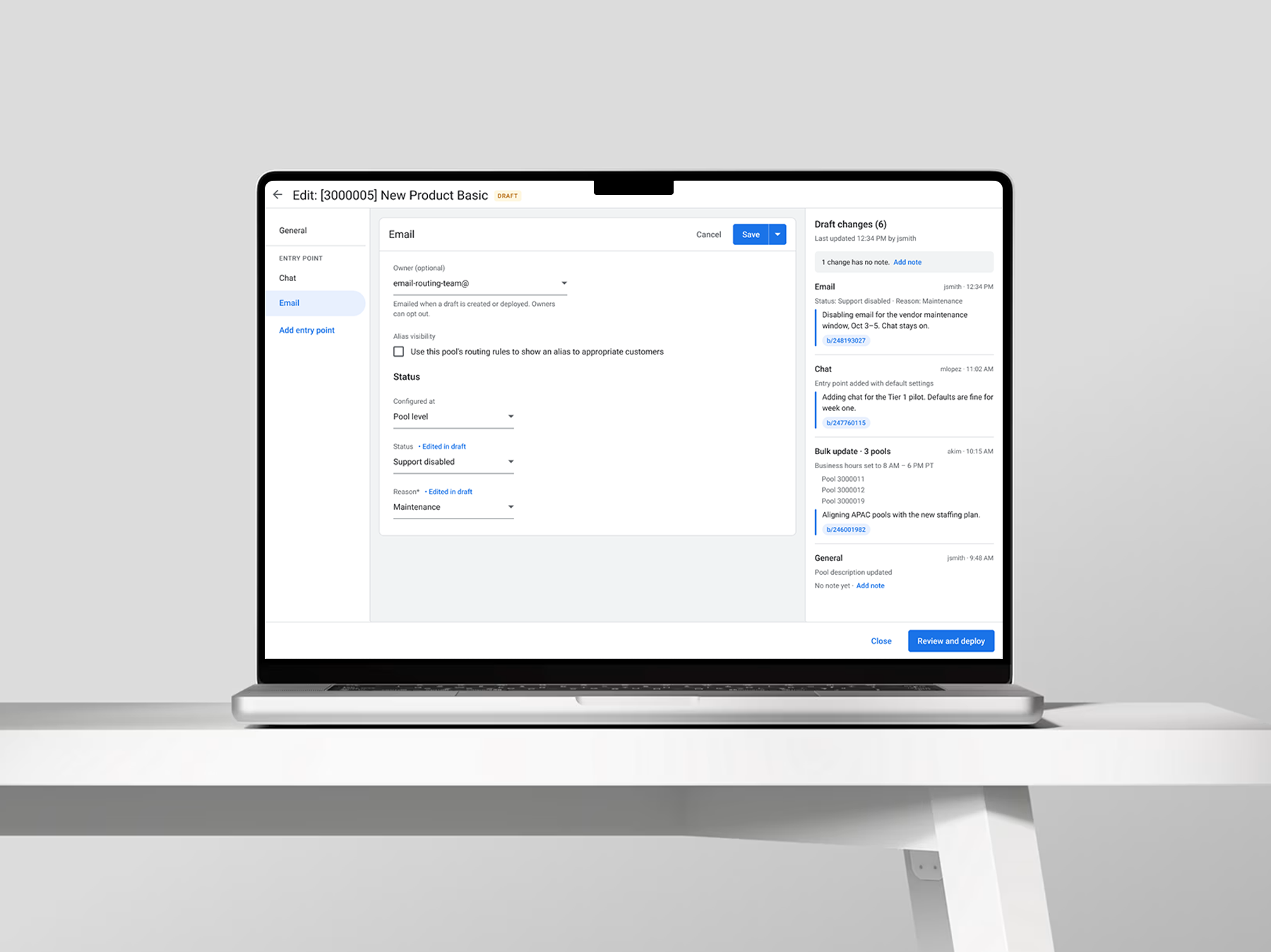
The Draft Annotations design in Cases Admin on a laptop: an Email entry point being edited in draft, next to a Draft changes panel that lists each change with its author, time, note and linked bug.

The short version

Problem

Admins could explain a change only at deploy. Shared drafts carried no rationale, so teammates dug through Buganizer or asked around.

What I did

Designed change-level annotations that carry into Review & Deploy and change history, plus ownership, notifications and bulk-edit grouping.

Result

[ADD RESULT] Testing validated the direction, and the PM and engineering team carried it to launch.

01 · Context

Case management is where support operations route every case.

Case management is where support operations configure the pools, aliases, dimensions and availability rules that route every case.

A change that looks small can reroute a whole product segment, and the person who makes it often isn’t the one who deploys it.
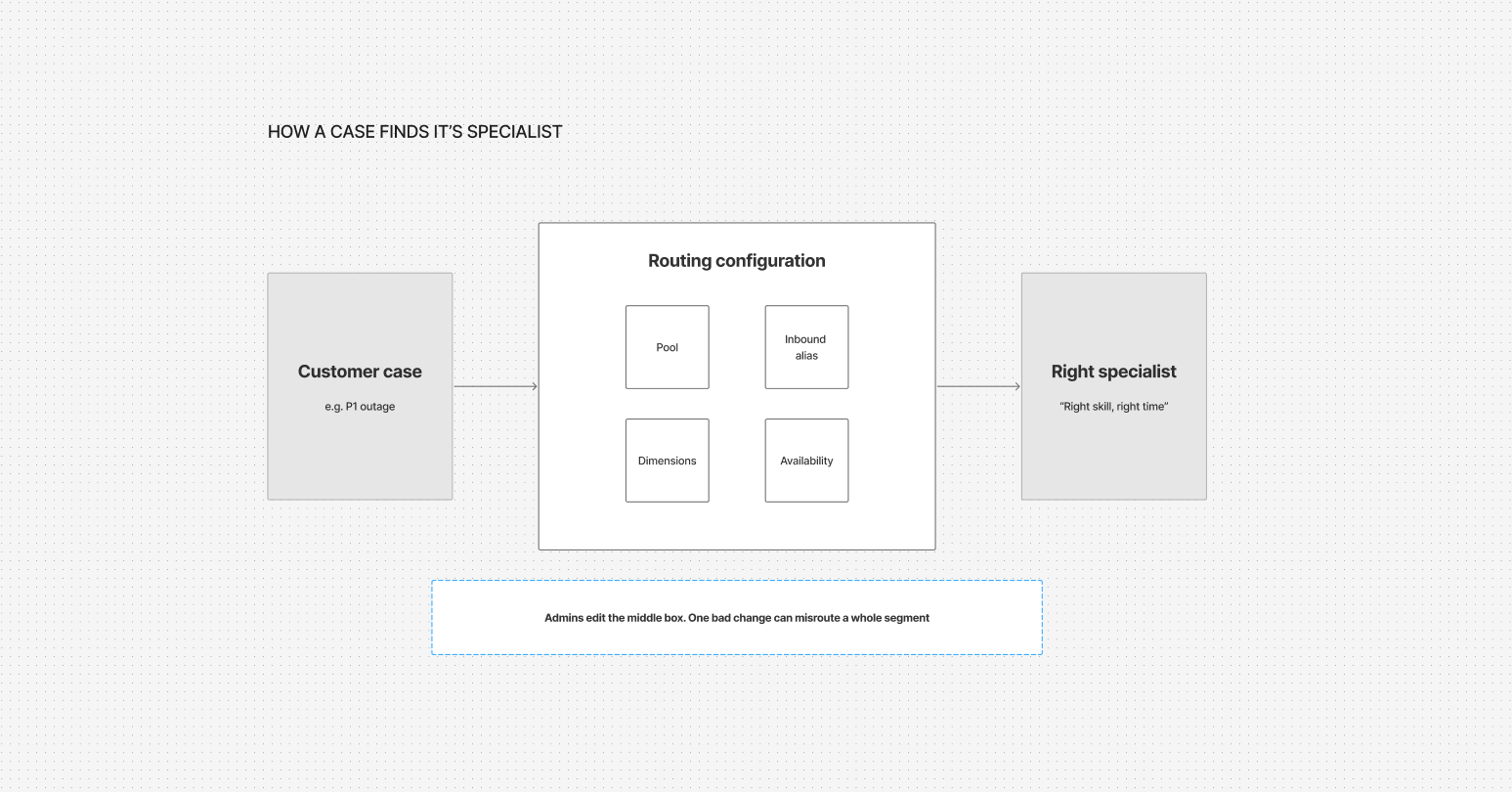
How a case finds its specialist: a customer case, such as a P1 outage, passes through the routing configuration (pool, inbound alias, dimensions and availability) to reach the right specialist. Admins edit the routing configuration, and one bad change can misroute a whole segment.
  • Pool configurator

    TechOps and platform leads, implementing support strategy with accuracy and speed.

  • Availability configurator

    TechOps and platform leads, implementing support strategy with accuracy and speed.

  • Real-time configurator

    WFM and site leads, responding to live shifts in support volume.

02 · The problem

Context existed only after the collaboration was over.

Admins could already add notes when they deployed. The confusion happened earlier, while several people were still working in the same draft.

  • 1 of 2Notes existed only at deploy, while drafts had none
  • 3 of 3Key tasks needed a tool outside case management
  • “I’d open a draft and see twelve changes I didn’t make. Before I touched anything, I had to go find out who made them and why.”
    Case management admin

03 · My role

What I owned, and what I shaped with the team.

I owned

  • The annotation interaction model, from draft to deploy
  • Review & Deploy and change history updates
  • Ownership and notification flows, with opt-out
  • Grouping for bulk, copy and cascade edits
  • Usability testing and user interviews

I influenced

  • P0 and P1 prioritization with the PM
  • The per-change data model with engineering
  • Alignment across ops leads for several product areas

04 · Constraints and success criteria

Constraints and success criteria.

Constraints

  • Extend existing surfaces; no new workflow
  • The issue tracker stays the system of record, and bug IDs are optional
  • Many admins edit one shared draft
  • Email-only notifications that are easy to opt out of
  • Must scale to the more ambitious 2022 release roadmap

Success criteria
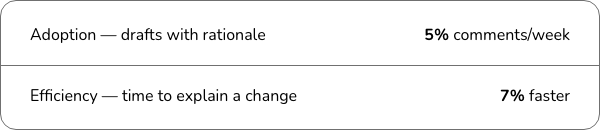
Success criteria. Adoption, measured as drafts with rationale: 5% comments per week. Efficiency, measured as time to explain a change: 7% faster.

05 · Key decisions

Three calls that shaped the outcome.

  1. 1

    Annotate each change, then carry it forward to deploy

    Options

    • One note per draft
    • Deploy-only (status quo)
    • A note on each change (chosen)

    Why this one

    A single draft note becomes an unowned log. Per-change notes stay with the change and autofill at deploy.

    What we gave up

    A clean, pre-written deploy summary, which made autofill and easy override essential.

  2. 2

    Owners get two notifications, not every edit

    Options

    • Notify on every change
    • Owner label only
    • Draft created and deployed, with opt-out (chosen)

    Why this one

    It answers “who needs to know?” without flooding inboxes. These are the two moments owners act.

    What we gave up

    Real-time awareness of every edit. Annotations in the draft cover that gap.

  3. 3

    Keep rationale optional but prompted

    The tension

    Ops leads asked for required rationale on every draft change. Optional notes get skipped, coverage suffers, and audit tools often require fields for completeness.

    Why this one

    Required notes would have recreated the original problem.

    What we gave up

    Guaranteed coverage. Some changes will lack notes, so we rely on prompts and norms instead of enforcement.

06 · The solution

The reason for a change now moves with it, from first draft through change history.
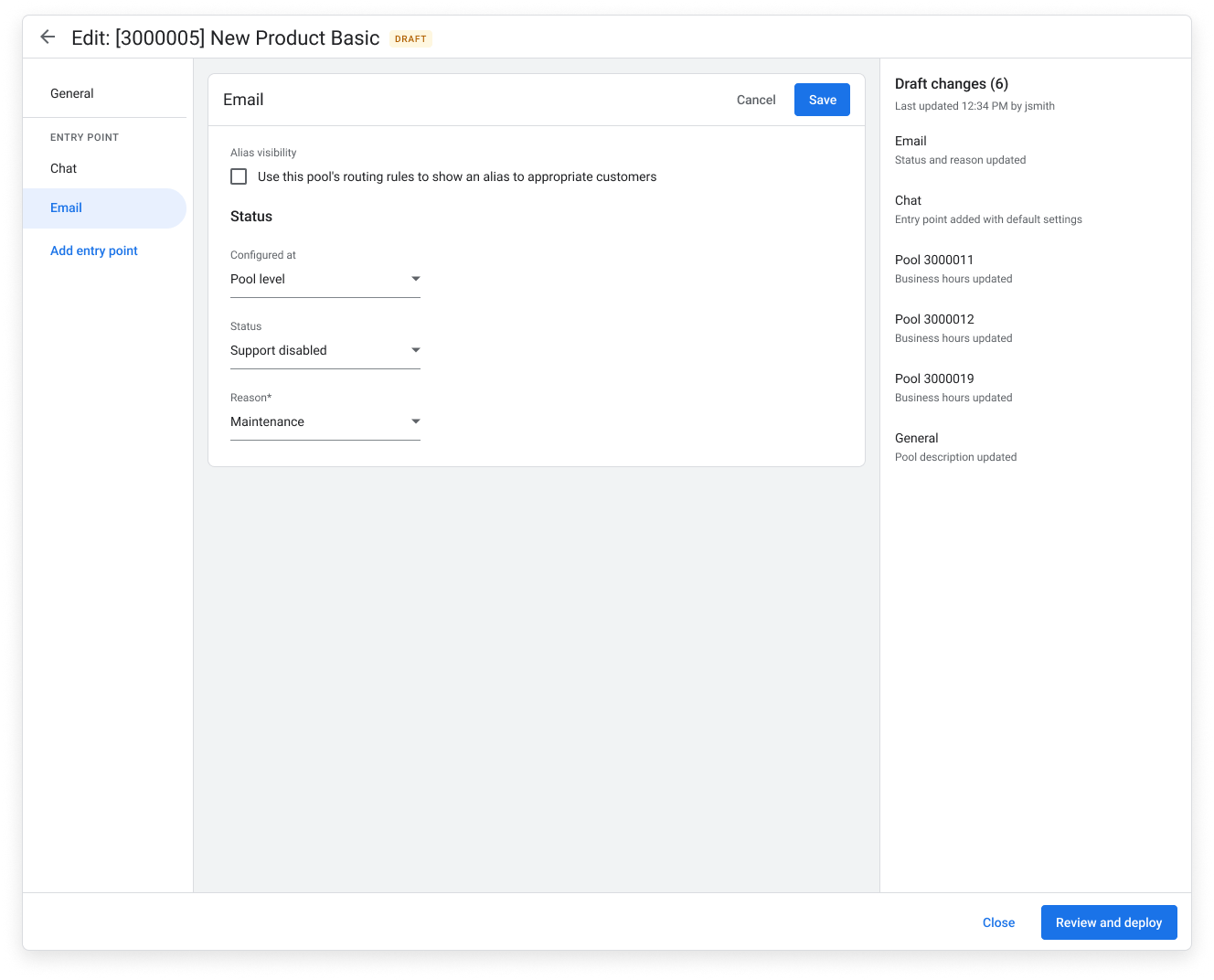
Before: the draft editor for pool 3000005. The Draft changes panel lists six changes with only a short description of each, with no author, time or reason.
Before
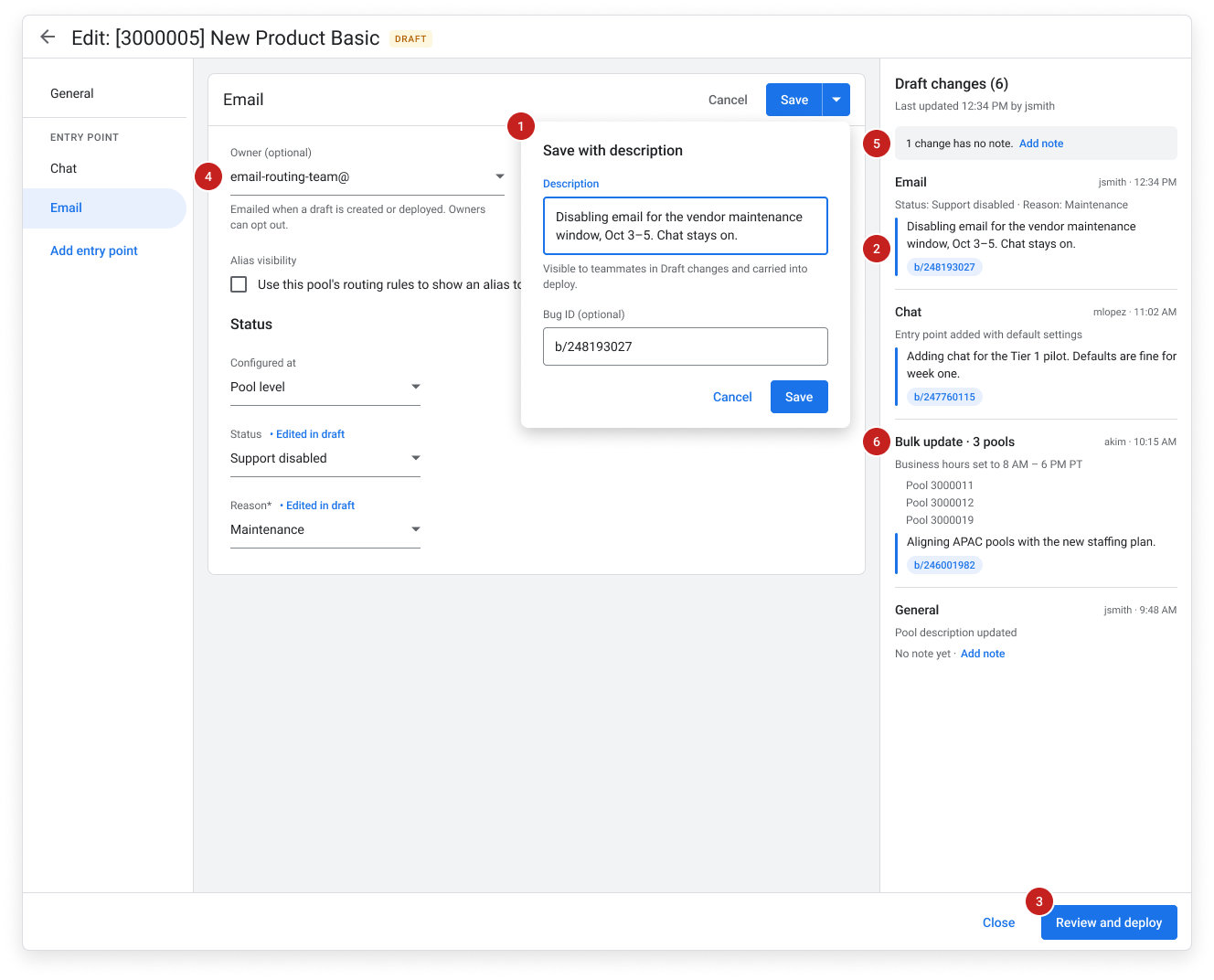
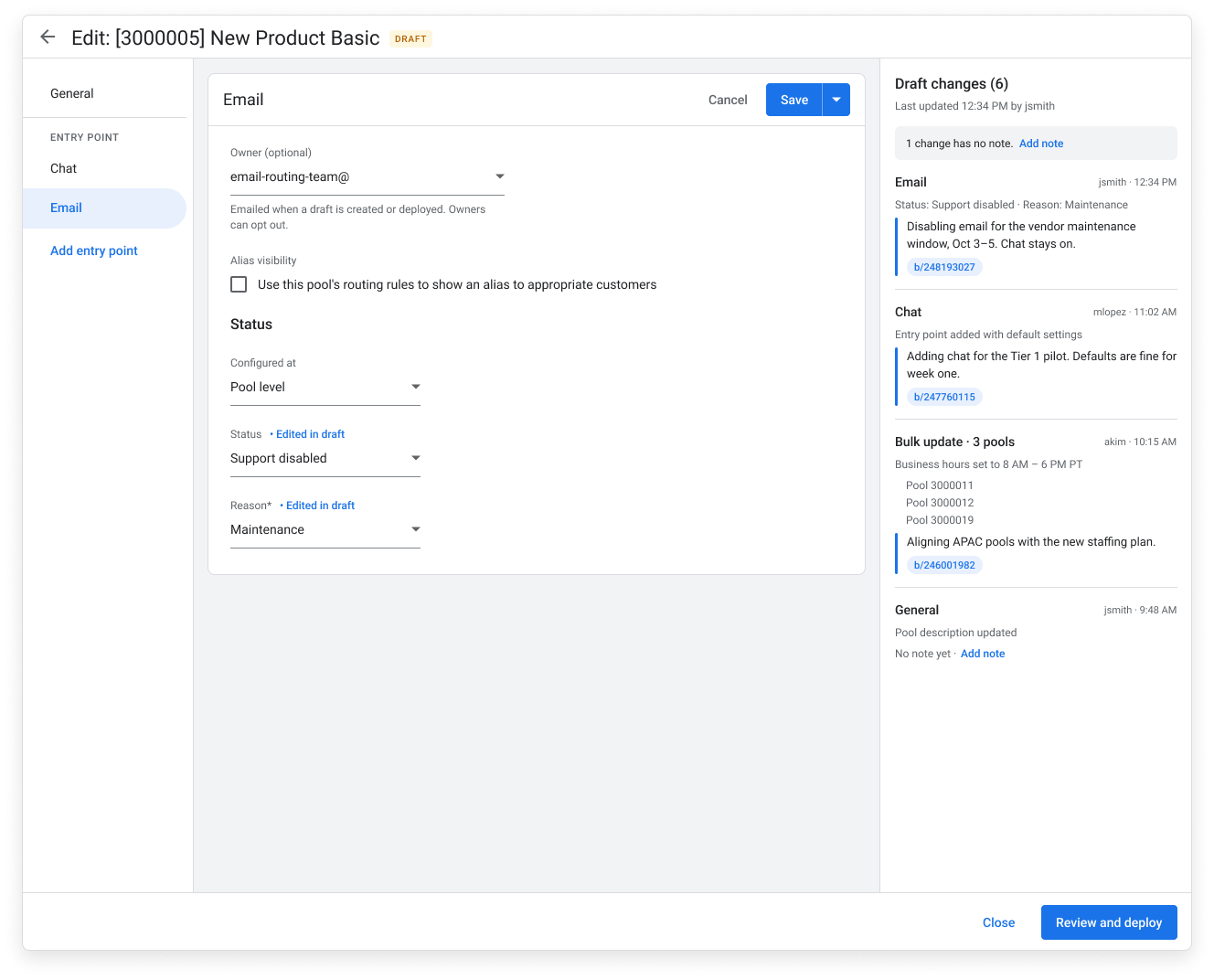
After: the same draft editor with annotations. Each change in the Draft changes panel shows its author, time, a note explaining why and a linked bug, and the panel flags the one change that has no note yet. An optional owner field sits at the top of the form.
After: each change carries its own note
The annotated draft editor, with numbered callouts: 1, the Save with description dialog, where an admin adds a note and an optional bug ID to a change; 2, that note shown on the change in the Draft changes panel; 3, the Review and deploy button, where notes autofill; 4, the optional owner field; 5, the prompt that flags a change with no note; 6, a bulk update across three pools grouped as one change.
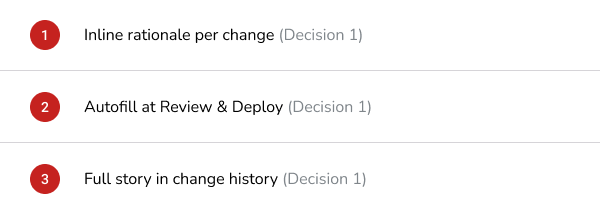
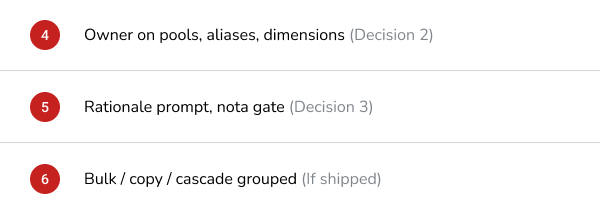
The annotated draft. Each number marks a part of the design, listed below with the decision it supports.
Callouts 1 to 3: inline rationale per change (decision 1); autofill at Review and Deploy (decision 1); full story in change history (decision 1).
Callouts 1–3
Callouts 4 to 6: owner on pools, aliases and dimensions (decision 2); rationale prompt, not a gate (decision 3); bulk, copy and cascade edits grouped (if shipped).
Callouts 4–6
The new flow: edit a setting in the shared draft, add a rationale and bug IDs, a teammate sees why inline, Review and Deploy autofills the note, and it lands in change history.
The note travels with the change: from the shared draft, through Review & Deploy, into change history.

07 · Validation

Before handoff, I tested the design with the people who’d use it.

  • Usability testing

    Three moderated sessions with admins from different departments. Each picked up a teammate’s draft, read the notes on each change, added a note and moved to Review & Deploy.

  • What we heard

    Feedback was consistently positive. Participants completed the core tasks and saw change-level notes as a clear improvement over piecing context together from Buganizer and chat.

  • After my contract

    The feature launched after my contract ended. Testing validated the direction, and the PM and engineering team carried it through to launch.

Have a problem like this? I’m open to senior product design roles. Reach out by email or LinkedIn.
Email me
All work

Google · Cases Admin

Draft Annotations: putting the why inside the draft

Bringing the why into the draft itself, so admins updating Google’s support routing can see the reason behind a change without digging through bug tickets and chat.

Role
UX Visual Designer
Team
1 PM, 2 Engineers
Timeline
6 months, 2022
Platform
Internal desktop web tool
The Draft Annotations design in Cases Admin on a laptop: an Email entry point being edited in draft, next to a Draft changes panel that lists each change with its author, time, note and linked bug.

The short version

Problem

Admins could explain a change only at deploy. Shared drafts carried no rationale, so teammates dug through Buganizer or asked around.

What I did

Designed change-level annotations that carry into Review & Deploy and change history, plus ownership, notifications and bulk-edit grouping.

Result

[ADD RESULT] Testing validated the direction, and the PM and engineering team carried it to launch.

01 · Context

Case management is where support operations route every case.

Support operations configure the pools, aliases, dimensions and availability rules that route every case. A change that looks small can reroute a whole product segment, and the person who makes it often isn’t the one who deploys it.

  • Pool configurator

    TechOps and platform leads, implementing support strategy with accuracy and speed.

  • Availability configurator

    TechOps and platform leads, implementing support strategy with accuracy and speed.

  • Real-time configurator

    WFM and site leads, responding to live shifts in support volume.

02 · The problem

Context existed only after the collaboration was over.

Admins could already add notes when they deployed. The confusion happened earlier, while several people were still working in the same draft.

1 of 2Notes only at deploy; drafts had none
3 of 3Key tasks needed a tool outside case management
“I’d open a draft and see twelve changes I didn’t make. Before I touched anything, I had to go find out who made them and why.”
Case management admin

03 · My role

What I owned, and what I shaped with the team.

I owned

  • The annotation interaction model, from draft to deploy
  • Review & Deploy and change history updates
  • Ownership and notification flows, with opt-out
  • Grouping for bulk, copy and cascade edits
  • Usability testing and user interviews

I influenced

  • P0 and P1 prioritization with the PM
  • The per-change data model with engineering
  • Alignment across ops leads for several product areas

04 · Constraints and success criteria

Constraints and success criteria.

Constraints

  • Extend existing surfaces; no new workflow
  • The issue tracker stays the system of record, and bug IDs are optional
  • Many admins edit one shared draft
  • Email-only notifications that are easy to opt out of
  • Must scale to the more ambitious 2022 release roadmap

Success criteria

05 · Key decisions

Three calls that shaped the outcome.

  1. 1

    Annotate each change, then carry it forward to deploy

    Options

    • One note per draft
    • Deploy-only (status quo)
    • A note on each change (chosen)

    Why this one

    A single draft note becomes an unowned log. Per-change notes stay with the change and autofill at deploy.

    What we gave up

    A clean, pre-written deploy summary, which made autofill and easy override essential.

  2. 2

    Owners get two notifications, not every edit

    Options

    • Notify on every change
    • Owner label only
    • Draft created and deployed, with opt-out (chosen)

    Why this one

    It answers “who needs to know?” without flooding inboxes. These are the two moments owners act.

    What we gave up

    Real-time awareness of every edit. Annotations in the draft cover that gap.

  3. 3

    Keep rationale optional but prompted

    The tension

    Ops leads asked for required rationale on every draft change. Optional notes get skipped, and audit tools often require fields for completeness.

    Why this one

    Required notes would have recreated the original problem.

    What we gave up

    Guaranteed coverage. We rely on prompts and norms instead of enforcement.

06 · The solution

The reason for a change now moves with it, from first draft through change history.
Before
After: each change carries its own note
The annotated draft. Each number marks a part of the design, listed below with the decision it supports.
Callouts 1–6 and the decision each supports
The note travels with the change: from the shared draft, through Review & Deploy, into change history.

07 · Validation

Before handoff, I tested the design with the people who’d use it.

  • Usability testing

    Three moderated sessions with admins from different departments, covering picking up a teammate’s draft, reading and adding notes, and moving to Review & Deploy.

  • What we heard

    Participants completed the core tasks and saw change-level notes as a clear improvement over Buganizer and chat.

  • After my contract

    The feature launched after my contract ended; the PM and engineering team carried it through.

Have a problem like this? I’m open to senior product design roles. Reach out by email or LinkedIn.
Email me
Previous case study Vehicle Preview Enhancements Next case study Surveys On The Go: Onboarding